

- Custom Variable Widget
- Priority Matrix
- Heatmap Widget
- Grid Widget
- Weighted mean widget
- Comment List widget
- Widget Filters
- Ranking List Widget
- Distribution Chart
- NPS Widget
- Trend Widget
- Word Cloud Widget
- Cross tab widget
- KPI Comparison Widget
- Bubble chart
- Custom Metric Trend Chart
- Trend Comparison Widget

Trigger Rules Settings Overview
Trigger rules are used to control when and to whom an intercept is shown. You can define conditions based on user behavior, session activity, and environment.
Rules are configured as a flat list:
- Each intercept contains individual rules
- You can apply only one logic type: AND or OR
- AND: All conditions must be met
- OR: Any condition can be met
To add a new rule:
- Open the intercept where you want to configure targeting
- Click the Add Rule button
- Select the rule type and define the condition
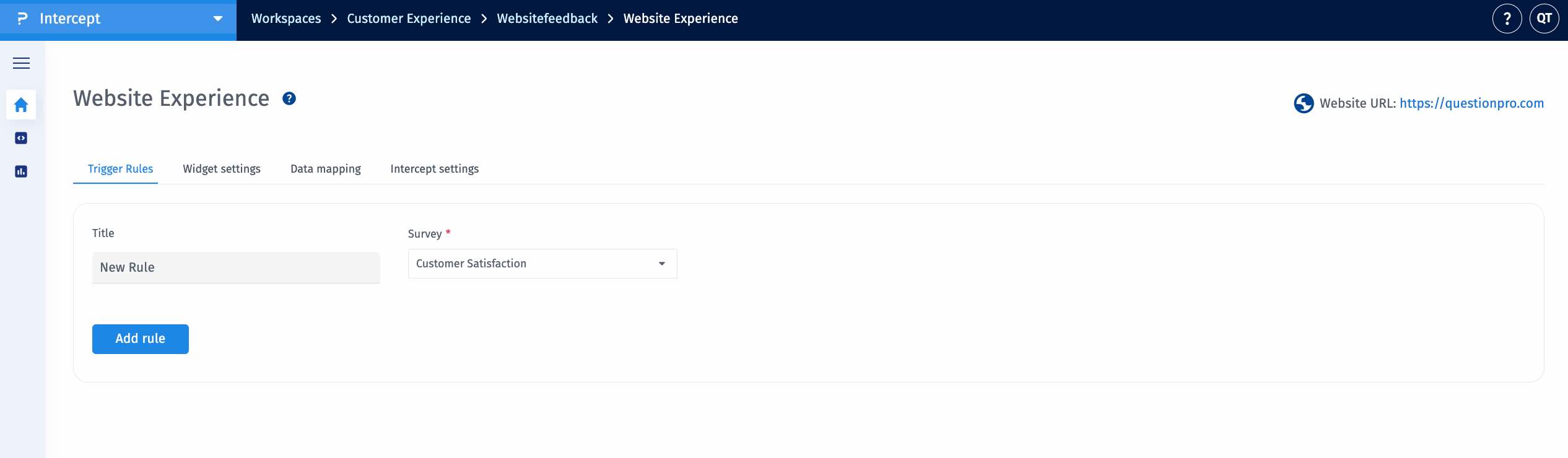
This allows you to configure when the intercept should be triggered.
The platform offers a range of rule types to tailor intercept targeting:
-
Country:
Trigger intercepts based on the visitor’s geographic location.
-
Browser Type:
Target users according to the browser they are using, such as Chrome, Firefox, Safari, or Edge.
-
Device Type:
Segment users based on their device category, including Mobile, Tablet, or Desktop.
-
Operating System:
Restrict intercepts to users operating on specific systems (e.g., Windows, macOS, iOS, Android).
-
Button:
Trigger an intercept when a designated button is clicked, identified using its HTML ID.
Example: Pay Now Entering the ID pay will trigger the intercept upon the button click. -
Page URL:
Configure intercepts for specific pages using URL-based conditions.
Supported operators include Equals, Not Equals, Includes, and Excludes. -
Session Duration:
Trigger an intercept after a visitor has spent a specified amount of time on the website.
-
User Type:
Target users based on their visit history:
- New visitors
- Returning visitors
Note: Cookie expiration can be configured in Project Settings. Once expired, users are treated as new visitors. -
URL Parameter:
Trigger intercepts based on values present in URL query parameters.
-
IP Address:
Include or exclude users based on their IP address.
-
Data Layer:
Leverage variables defined within your website’s data layer to trigger intercepts.
Example: If user.plan = premium, the intercept will be displayed. Variable naming formats:- ObjectName.VariableName
- VariableName (global)
-
Pages Visited:
Trigger intercepts based on the number of pages viewed within the current session.
Example: Display an intercept after a user has visited three pages. -
Scroll Depth:
Trigger intercepts based on how far a visitor has scrolled on a webpage. This allows you to engage users after they have viewed a specific portion of the content.
Example: Display an intercept when a user scrolls 50% or 75% down the page. -
HTML Selector:
Trigger intercepts based on user interaction with specific HTML elements identified via CSS selectors.
Examples: #signup-button, .menu-item -
Total Visits:
Trigger intercepts based on the total number of visits a user has made to the website, tracked using browser cookies.
Example: Display an intercept only on the user’s second or third visit.
| Rule Type | Variable Details | Supported Operands | Values |
| Country | Equals to, Not equals to | All Countries | |
| Browser Type | Equals to, Not equals to | Chrome, Firefox, Safari, Edge | |
| Device Type | Equals to, Not equals to | Mobile, Tablet, Desktop | |
| Operating System | Equals to, Not equals to | Windows, macOS, Linux, Android, iOS | |
| Button | Equals to | HTML Button ID | |
| Page URL | Equals to, Not equals to, Includes, Excludes | Page URL | |
| Session Duration | Greater than | Time (MM:SS) | |
| User Type | Equals to | New visitor, Returning visitor | |
| URL Parameter | Parameter name | Equals to, Not equals to, Includes, Excludes | Parameter value |
| IP Address | Equals to, Not equals to, Includes, Excludes, Between | IP address | |
| Data Layer | objectName.variableName | Equals to, Not equals to, Includes, Excludes | Variable value |
| Pages Visited | Greater than, Equals to | Number of pages | |
| HTML Selector | CSS Selector | Equals to | Element selector (ID/Class) |
| Total Visits | Greater than, Equals to | Number of visits |
